Command Mode for
Magnifying Glass Pro
The Command
Mode for this application is a unique method of adjusting various
parameters of the Glass, on the fly.
Such elements as transparency, size, and scale may be adjusted through
simple mouse movements, alone, and the results are carried out and displayed on
the Glass in realtime. No Dialog box is
needed, nor do any numbers need to be typed in.
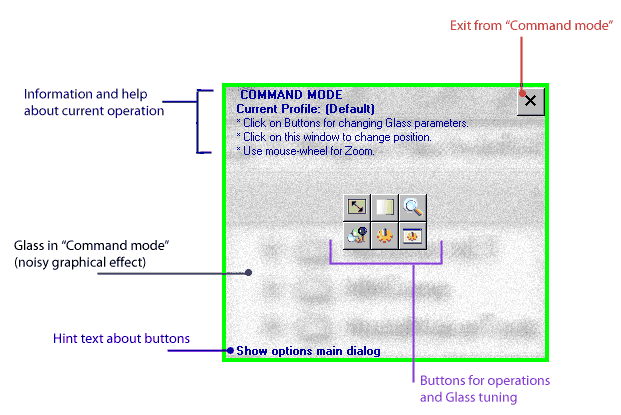
Command Mode’s main window
Command Mode
may be entered into by pressing (and holding) the user-assigned hot key
(default assignment is Ctrl+Alt+MouseMove),
or by Mouse Shaking, if that feature is enabled. In Command Mode, it is possible to alter the
Glass settings both when the Glass is visible and also when it is inactive.
Choices contained in Command Mode include:
- Glass Size
- Transparency
- Zoom Factor
- Profile Switching
- Miscellaneous Options
- Anti-aliasing
- Cursor Magnification
- Main Options Dialog Window
Note that, as soon as Command Mode is activated and a
change is made, that change is entered into the current, active Profile. Thus, if you are working in Auto-Switching
mode you should be especially careful to know which Profile is being changed,
lest a mouse movement cause the active Profile to change and a Command Mode
alteration be applied to the incorrect Profile.
In Command Mode, the inset window contains usage
reminders and descriptions. The current
Profile is always indicated in the upper-left.
If the mouse is moved over the selection buttons in the center of the
inset, usage hints appear in the bottom-left of the window.
Basic Command Mode usage:
- Once Command Mode has been activated, the window may be moved by pressing the left mouse
button in an empty area and dragging.
With the release of the button, the window will be “dropped”. If the current Profile has the Glass
Position set to “Fixed” or “Fixed Elusive”, then the Glass window will
remain in this new location.
- When Command Mode is active, then the mouse may be used to drag the
window to a new height and width,
from the bottom right of the window.
When Command Mode is exited, then the current Glass and its Profile
will retain the new size.
- With Command Mode active, the Transparency
of the window may be changed.
Moving the mouse to the left causes the window to become increasingly tranparent;
to the right, decreasingly. In
other words, a full mouse-move to the left will make your Glass invisible
and a full mouse-move to the right will make it 100% visible.
Note that if the Glass is made too transparent, then
Command Mode becomes unusable, as all of the controls become transparent, as
well. If this occurs, the Transparency
setting (as well as any others) may be changed by selecting the taskbar Glass
icon with the right mouse button and then using the settings applet in the
usual manner.
- Using Command Mode, the scale
(zoom factor) of the Glass window may be changed. Moving the mouse to the left causes the
Glass to decrease its magnification and moving the mouse to the right
increases magnification. Again, the
setting is locked in when a mouse button is clicked or when Command Mode
is exited. The new scale factor
will be immediately available and will also be retained by the current
Profile. If the mouse could not be
moved enough in either direction to achieve the scale factor desired,
simply repeat the procedure until the desired scale is reached.
Note that, in Command Mode, the mouse
wheel may also be used to increase or decrease the level of magnification.
- Command Mode allows Profiles
to be manually switched. When a
switch is made, the Glass will remain in the newly selected Profile unless
the Auto-Switcher is active. When
the Profiles button is selected, a list of all available Profiles will be
displayed. Simply double-click on
the Profile desired and it will become active.
- Command Mode contains an icon labelled Misc Options. This selection allows both the toggling of
antialiasing and of mouse pointer magnification.
If Command Mode was entered either through the system menu
or through MouseShaking, the small “X” in the upper righthand portion of the
window may be used to exit. If a hotkey was used to enter the Mode, then
simply release the key or keys to exit.
To return to the main Command Mode window from a
sub-menu, the Arrow icon in the top
right corner may be selected. Note that
this works better in some screens than in others, as settings may continue to
change (esp., Scale and Transparency) while reaching for the Arrow.
Command Mode options described: Page «Command Mode».